









为了不挂科,我拼了
其实早在之前单元测试的时候,这个题库网页的雏形就有了。只不过当时功能比较简陋,一直不够完善。
最近临近期末,复习压力陡增。看着手里厚厚的题库 PDF 和乱七八糟的文档,我决定磨刀不误砍柴工,花点时间把它彻底重构一遍。每隔一段时间我就给它迭代一次,现在终于打磨到了我比较满意的状态。
为了方便部署和分享,我把它部署到了 Cloudflare Workers 里面。这样做的好处显而易见:
- 完全免费:对于我们学生党来说,不需要买服务器,每天 10 万次请求额度绰绰有余。
- 速度极快:全球边缘节点加速,打开网页秒开。
- 维护简单:不用管运维,代码上传就能用,可谓是一举多得。
界面展示:拒绝枯燥,颜值即正义
复习本身就很枯燥,如果工具长得丑,那就更学不下去了。所以我专门设计了暗黑模式 (Dark Mode) 的 UI,保护视力,深夜刷题也不刺眼。
最让我满意的是首页这个动态水波纹进度球:
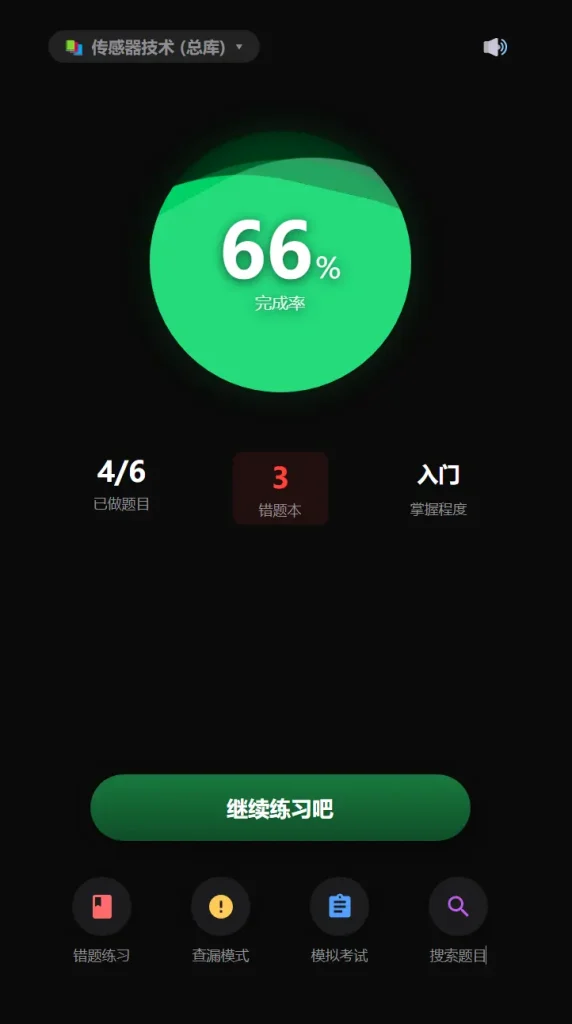
- 动态反馈:随着刷题数量增加,绿色的水位会不断上涨,通过视觉上的反馈给复习带来一点“成就感”。
- 数据看板:一眼就能看到已做题目数量、错题数量以及当前的掌握程度(从“入门”到“精通”)。
核心功能:它不仅仅是一个网页
别看它只有一个页面,麻雀虽小,五脏俱全。为了应对期末考试的各种场景,我开发了以下核心功能:
1. 沉浸式刷题体验
支持单选、多选、填空等多种题型。答题后立刻显示解析,不用翻书找答案,效率拉满。
2. 智能错题本(救命稻草)
看见那个红色的“3”了吗?系统会自动记录所有做错的题目。
- 一键重练:点击主页的“错题练习”按钮,系统会把所有错题打乱顺序重新让你做一遍,直到掌握为止。
- 自动移除:如果你在错题模式下答对了,题目会自动移出错题本,让你的“复习债”越还越少。
3. 多种复习模式
为了打破死记硬背的僵局,我设计了不同的入口:
- 普通模式:按顺序把题库刷一遍,稳扎稳打。
- 查漏模式:随机抽取题目,检验记忆盲区。
- 模拟考试:模拟真实考试环境,看看自己能这就多少分。
4. 题目秒搜
遇到不会的知识点想查题?主页自带全局搜索功能。输入关键词,瞬间定位到相关题目,支持展开查看答案和解析,简直是开卷考试(划掉)复习查资料的神器。
技术亮点:代码模块化管理
作为一个追求优雅的开发者,我不仅关注界面,也关注代码的维护性。
起初,所有题目和代码都塞在一个 worker.js 里,导致代码有几千行,改个题目非常痛苦。后来我利用 Cloudflare Workers 的 ES Modules 特性,对代码进行了模块化拆分。
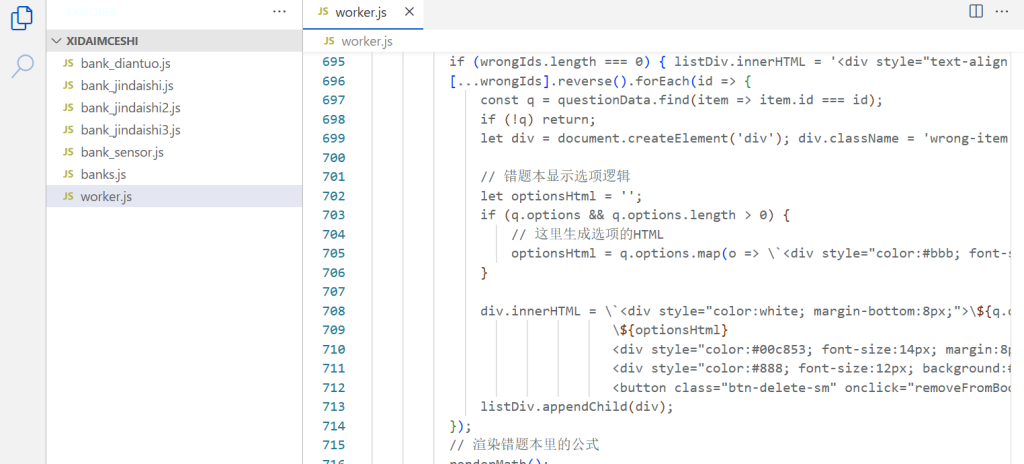
现在我的项目结构非常清晰:
worker.js:只负责逻辑处理和页面渲染,完全不用动。banks.js:作为“管理员”,负责注册和管理不同的题库。bank_sensor.js/bank_history.js:每个学科一个独立文件。
以后想增加一门新课的题库? 只需要在编辑器里 Right Click -> New File,粘贴题目数据,然后在 banks.js 里注册一行代码即可。这种“插拔式”的设计,让我可以轻松管理大学四年的所有题库。
以下为代码:
worker.js
import { allBanks } from './banks.js';
export default {
async fetch(request) {
const banksDataJson = JSON.stringify(allBanks);
const html = `
<!DOCTYPE html>
<html lang="zh-CN">
<head>
<meta charset="UTF-8">
<meta name="viewport" content="width=device-width, initial-scale=1.0, maximum-scale=1.0, user-scalable=no">
<title>不高兴就来刷题</title>
<link rel="stylesheet" href="https://cdn.jsdelivr.net/npm/katex@0.16.9/dist/katex.min.css">
<script defer src="https://cdn.jsdelivr.net/npm/katex@0.16.9/dist/katex.min.js"></script>
<script defer src="https://cdn.jsdelivr.net/npm/katex@0.16.9/dist/contrib/auto-render.min.js"></script>
<style>
:root {
--bg-color: #0a0a0a;
--card-bg: #1c1c1e;
--primary-color: #00c853;
--water-1: rgba(0, 230, 118, 0.9);
--water-2: rgba(105, 240, 174, 0.5);
--water-3: rgba(0, 200, 83, 0.3);
--text-main: #ffffff;
--text-sub: #8e8e93;
--danger: #ff453a;
--success: #30d158;
--search-color: #bf5af2;
}
* { box-sizing: border-box; -webkit-tap-highlight-color: transparent; }
body {
font-family: -apple-system, BlinkMacSystemFont, "PingFang SC", "Helvetica Neue", sans-serif;
background-color: var(--bg-color);
color: var(--text-main);
margin: 0; padding: 0; min-height: 100vh; display: flex; flex-direction: column;
}
.container { width: 100%; max-width: 480px; margin: 0 auto; min-height: 100vh; position: relative; display: flex; flex-direction: column; }
::-webkit-scrollbar { width: 0px; background: transparent; }
/* --- UI 样式 --- */
.header-bar { padding: 20px; text-align: center; font-size: 18px; font-weight: 600; position: relative; height: 60px; display: flex; justify-content: center; align-items: center; }
.header-btn { position: absolute; top: 20px; cursor: pointer; font-size: 20px; color: var(--text-sub); padding: 5px; }
.header-btn.left { left: 20px; }
.header-btn.right { right: 20px; }
.bank-switch-btn { font-size: 14px; display: flex; align-items: center; gap: 5px; background: rgba(255,255,255,0.1); padding: 4px 12px; border-radius: 15px; cursor: pointer; }
.dashboard { flex: 1; display: flex; flex-direction: column; align-items: center; padding: 20px; }
.water-container { width: 220px; height: 220px; border-radius: 50%; background: radial-gradient(circle, #004d26 0%, #002e12 100%); position: relative; overflow: hidden; margin: 30px 0 50px 0; box-shadow: 0 0 30px rgba(0, 200, 83, 0.15), inset 0 0 20px rgba(0,0,0,0.5); z-index: 1; transition: transform 0.3s; }
.water-container:hover { transform: scale(1.02); box-shadow: 0 0 40px rgba(0, 200, 83, 0.3), inset 0 0 10px rgba(0,0,0,0.5); }
.wave { position: absolute; width: 200%; height: 200%; left: 50%; border-radius: 40% 45%; transform: translate(-50%, -50%); animation: rotate linear infinite; z-index: 1; top: 200%; transition: top 0.8s cubic-bezier(0.4, 0, 0.2, 1); }
.wave.one { background: var(--water-1); animation-duration: 8s; z-index: 10; }
.wave.two { background: var(--water-2); animation-duration: 10s; animation-direction: reverse; border-radius: 35% 45%; z-index: 11; }
.wave.three { background: var(--water-3); animation-duration: 6s; border-radius: 42% 38%; z-index: 12; }
@keyframes rotate { 0% { transform: translate(-50%, -50%) rotate(0deg); } 100% { transform: translate(-50%, -50%) rotate(360deg); } }
.circle-content { position: absolute; top: 0; left: 0; width: 100%; height: 100%; display: flex; flex-direction: column; justify-content: center; align-items: center; z-index: 20; pointer-events: none; text-shadow: 0 2px 10px rgba(0,0,0,0.6); }
.circle-percent { font-size: 64px; font-weight: 700; line-height: 1; font-family: 'Oswald', sans-serif; color: #fff; }
.circle-percent span { font-size: 24px; font-weight: normal; margin-left: 2px;}
.circle-label { font-size: 14px; color: rgba(255,255,255,0.9); margin-top: 5px; }
.stats-row { display: flex; justify-content: space-around; width: 100%; margin-bottom: 40px; }
.stat-item { text-align: center; min-width: 80px; }
.stat-val { font-size: 24px; font-weight: bold; font-family: 'Oswald', sans-serif;}
.stat-label { font-size: 12px; color: var(--text-sub); margin-top: 4px; }
.clickable-stat { cursor: pointer; padding: 5px 10px; border-radius: 8px; background: rgba(255, 69, 58, 0.1); transition: all 0.2s; }
.clickable-stat:active { transform: scale(0.95); opacity: 0.8; }
.btn-main-action { width: 80%; height: 56px; background-color: #0f4d28; border-radius: 28px; border: none; color: white; font-size: 18px; font-weight: 600; cursor: pointer; box-shadow: 0 4px 15px rgba(0, 0, 0, 0.3); background: linear-gradient(180deg, #187a3e 0%, #0f4d28 100%); margin-bottom: 30px; transition: transform 0.1s; }
.btn-main-action:active { transform: scale(0.98); }
.bottom-grid { display: grid; grid-template-columns: repeat(4, 1fr); width: 100%; padding-bottom: 30px; }
.grid-item { display: flex; flex-direction: column; align-items: center; cursor: pointer; }
.icon-box { width: 50px; height: 50px; background-color: var(--card-bg); border-radius: 50%; display: flex; justify-content: center; align-items: center; margin-bottom: 8px; font-size: 22px; box-shadow: 0 2px 10px rgba(0,0,0,0.2); transition: background 0.2s; }
.icon-box.red { color: #ff6b6b; }
.icon-box.yellow { color: #feca57; }
.icon-box.blue { color: #54a0ff; }
.icon-box.purple { color: var(--search-color); }
.grid-item:active .icon-box { background-color: #333; }
.grid-label { font-size: 12px; color: var(--text-sub); }
.modal-overlay { display: none; position: fixed; top: 0; left: 0; width: 100%; height: 100%; background: rgba(0,0,0,0.7); z-index: 200; justify-content: center; align-items: center; backdrop-filter: blur(5px); animation: fadeIn 0.2s ease; }
.modal-overlay.active { display: flex; }
.bank-list-card { width: 85%; max-width: 400px; background: var(--card-bg); border-radius: 20px; padding: 20px; max-height: 70vh; display: flex; flex-direction: column; }
.bank-list-title { font-size: 18px; font-weight: bold; margin-bottom: 15px; text-align: center; }
.bank-list-content { overflow-y: auto; flex: 1; }
.bank-item { padding: 15px; margin-bottom: 10px; background: rgba(255,255,255,0.05); border-radius: 12px; cursor: pointer; border: 1px solid transparent; display: flex; justify-content: space-between; align-items: center; }
.bank-item.active { border-color: var(--primary-color); background: rgba(0, 200, 83, 0.1); }
.bank-name { font-weight: 500; font-size: 16px; }
.bank-count { font-size: 12px; color: #666; }
.btn-close-modal { margin-top: 15px; width: 100%; padding: 12px; background: #333; color: white; border: none; border-radius: 10px; }
.screen { display: none; width: 100%; height: 100%; padding: 20px; background-color: var(--bg-color); position: absolute; top: 0; left: 0; overflow-y: auto; z-index: 1; }
.screen.active { display: flex; flex-direction: column; z-index: 50; animation: fadeIn 0.3s ease; }
@keyframes fadeIn { from { opacity: 0; } to { opacity: 1; } }
.top-nav { display: flex; justify-content: space-between; align-items: center; margin-bottom: 20px; color: var(--text-sub); font-size: 14px; width: 100%; }
.nav-btn { background: none; border: none; color: var(--text-sub); font-size: 16px; cursor: pointer;}
.question-text { font-size: 18px; line-height: 1.6; margin-bottom: 30px; font-weight: 500; }
.question-type { display: inline-block; background: rgba(0, 200, 83, 0.2); color: var(--primary-color); padding: 2px 8px; border-radius: 4px; font-size: 12px; margin-right: 8px; vertical-align: 2px; }
.question-text img { max-width: 100%; border-radius: 8px; margin: 10px 0; }
.options-list { display: flex; flex-direction: column; gap: 15px; width: 100%; }
.option-item { background-color: var(--card-bg); padding: 18px; border-radius: 12px; border: 1px solid #333; cursor: pointer; transition: all 0.2s; display: flex; align-items: center; }
.option-item.selected { border-color: var(--primary-color); background-color: rgba(0, 200, 83, 0.1); }
.option-letter { width: 30px; height: 30px; border-radius: 50%; background: #333; color: #888; display: flex; align-items: center; justify-content: center; margin-right: 15px; font-size: 14px; font-weight: bold; flex-shrink: 0; }
.option-item.correct { border-color: var(--success); background-color: rgba(48, 209, 88, 0.2); }
.option-item.correct .option-letter { background-color: var(--success); color: white; }
.option-item.wrong { border-color: var(--danger); background-color: rgba(255, 69, 58, 0.2); }
.option-item.wrong .option-letter { background-color: var(--danger); color: white; }
.feedback-sheet { position: fixed; bottom: 0; left: 0; width: 100%; background-color: #2c2c2e; border-top-left-radius: 20px; border-top-right-radius: 20px; padding: 25px; box-shadow: 0 -5px 20px rgba(0,0,0,0.5); transform: translateY(100%); transition: transform 0.3s cubic-bezier(0.4, 0, 0.2, 1); z-index: 100; }
.feedback-sheet.show { transform: translateY(0); }
.feedback-header { display: flex; justify-content: space-between; align-items: center; margin-bottom: 15px; }
.feedback-status { font-weight: bold; font-size: 18px; }
.status-correct { color: var(--success); }
.status-wrong { color: var(--danger); }
.feedback-content { font-size: 14px; color: #ccc; line-height: 1.6; max-height: 40vh; overflow-y: auto; margin-bottom: 20px;}
.btn-next { width: 100%; padding: 15px; background-color: var(--primary-color); color: white; border: none; border-radius: 30px; font-size: 16px; font-weight: bold; cursor: pointer; }
.wrong-item { background: var(--card-bg); padding: 15px; border-radius: 10px; margin-bottom: 10px; width: 100%; }
.btn-delete-sm { float: right; font-size: 12px; color: #666; background: none; border: 1px solid #444; padding: 2px 8px; border-radius: 4px; cursor: pointer; }
#action-area { padding-top: 20px; display: none; }
#fill-blank-area { display: none; width: 100%; flex-direction: column; align-items: center; gap: 20px; }
#fill-input { width: 100%; padding: 15px; background: var(--card-bg); border: 1px solid #333; border-radius: 12px; color: #fff; font-size: 16px; font-family: inherit; resize: none; margin-bottom: 10px; transition: border-color 0.2s; }
#fill-input:focus { border-color: var(--primary-color); outline: none; }
.answer-box { background: rgba(0, 200, 83, 0.1); padding: 20px; border-radius: 12px; width: 100%; text-align: center; font-size: 18px; color: var(--primary-color); border: 1px solid var(--primary-color); display: none; }
.answer-box.visible { display: block; animation: fadeIn 0.3s; }
.btn-reveal { width: 100%; padding: 15px; background: #333; color: white; border: 1px solid #555; border-radius: 12px; font-size: 16px; cursor: pointer; }
.self-judge-btns { display: none; width: 100%; justify-content: space-between; gap: 15px; }
.self-judge-btns.visible { display: flex; }
.btn-judge { flex: 1; padding: 15px; border-radius: 12px; border: none; font-weight: bold; cursor: pointer; color: white;}
.btn-judge.correct { background-color: var(--success); }
.btn-judge.wrong { background-color: var(--danger); }
#search-input-box { width: 100%; padding: 15px 15px 15px 45px; background: var(--card-bg) url("data:image/svg+xml,%3Csvg xmlns='http://www.w3.org/2000/svg' width='20' height='20' viewBox='0 0 24 24' fill='none' stroke='%23888' stroke-width='2' stroke-linecap='round' stroke-linejoin='round'%3E%3Ccircle cx='11' cy='11' r='8'%3E%3C/circle%3E%3Cline x1='21' y1='21' x2='16.65' y2='16.65'%3E%3C/line%3E%3C/svg%3E") no-repeat 15px center; border: 1px solid #333; border-radius: 25px; color: white; font-size: 16px; outline: none; margin-bottom: 20px; }
#search-input-box:focus { border-color: var(--search-color); }
.search-result-item { background: var(--card-bg); border-radius: 12px; padding: 15px; margin-bottom: 10px; cursor: pointer; border: 1px solid transparent; transition: all 0.2s; }
.search-result-item:hover { background: #252525; }
.search-result-item.expanded { border-color: var(--search-color); background: rgba(191, 90, 242, 0.05); }
.s-question { font-size: 15px; line-height: 1.5; color: #fff; }
.s-type { display: inline-block; font-size: 12px; padding: 2px 6px; border-radius: 4px; background: rgba(255,255,255,0.1); color: #ccc; margin-right: 6px; }
.s-answer-area { display: none; margin-top: 15px; padding-top: 15px; border-top: 1px solid rgba(255,255,255,0.1); font-size: 14px; color: #ccc; }
.s-answer-area.show { display: block; animation: fadeIn 0.3s; }
.s-ans-line { margin-bottom: 5px; color: var(--success); font-weight: bold; }
</style>
</head>
<body>
<div class="container">
<div id="menu-screen" class="screen active">
<div class="header-bar">
<div class="header-btn left" onclick="openBankModal()">
<div class="bank-switch-btn">📚 <span id="current-bank-name">加载中...</span> ▾</div>
</div>
<div class="header-btn right" onclick="toggleSound()" id="sound-icon">🔊</div>
</div>
<div class="dashboard">
<div class="water-container">
<div class="wave one" id="wave1"></div>
<div class="wave two" id="wave2"></div>
<div class="wave three" id="wave3"></div>
<div class="circle-content">
<div class="circle-percent" id="home-percent">0<span>%</span></div>
<div class="circle-label">完成率</div>
</div>
</div>
<div class="stats-row">
<div class="stat-item">
<div class="stat-val" id="home-done-count">0/0</div>
<div class="stat-label">已做题目</div>
</div>
<div class="stat-item clickable-stat" onclick="openWrongBook()">
<div class="stat-val" id="home-wrong-count" style="color: #ff453a;">0</div>
<div class="stat-label">错题本</div>
</div>
<div class="stat-item">
<div class="stat-val" id="mastery-level" style="font-size: 18px; line-height: 36px;">入门</div>
<div class="stat-label">掌握程度</div>
</div>
</div>
<div style="flex:1"></div>
<button class="btn-main-action" onclick="startMode('normal')">继续练习吧</button>
<div class="bottom-grid">
<div class="grid-item" onclick="startMode('wrong_practice')">
<div class="icon-box red"><svg width="24" height="24" fill="currentColor" viewBox="0 0 24 24"><path d="M18 2H6c-1.1 0-2 .9-2 2v16c0 1.1.9 2 2 2h12c1.1 0 2-.9 2-2V4c0-1.1-.9-2-2-2zM6 4h5v8l-2.5-1.5L6 12V4z"/></svg></div>
<div class="grid-label">错题练习</div>
</div>
<div class="grid-item" onclick="startMode('review')">
<div class="icon-box yellow"><svg width="24" height="24" fill="currentColor" viewBox="0 0 24 24"><path d="M12 2C6.48 2 2 6.48 2 12s4.48 10 10 10 10-4.48 10-10S17.52 2 12 2zm1 15h-2v-2h2v2zm0-4h-2V7h2v6z"/></svg></div>
<div class="grid-label">查漏模式</div>
</div>
<div class="grid-item" onclick="startMode('exam')">
<div class="icon-box blue"><svg width="24" height="24" fill="currentColor" viewBox="0 0 24 24"><path d="M19 3h-4.18C14.4 1.84 13.3 1 12 1c-1.3 0-2.4.84-2.82 2H5c-1.1 0-2 .9-2 2v14c0 1.1.9 2 2 2h14c1.1 0 2-.9 2-2V5c0-1.1-.9-2-2-2zm-7 0c.55 0 1 .45 1 1s-.45 1-1 1-1-.45-1-1 .45-1 1-1zm2 14H7v-2h7v2zm3-4H7v-2h10v2zm0-4H7V7h10v2z"/></svg></div>
<div class="grid-label">模拟考试</div>
</div>
<div class="grid-item" onclick="startSearchMode()">
<div class="icon-box purple"><svg width="24" height="24" fill="currentColor" viewBox="0 0 24 24"><path d="M15.5 14h-.79l-.28-.27C15.41 12.59 16 11.11 16 9.5 16 5.91 13.09 3 9.5 3S3 5.91 3 9.5 5.91 16 9.5 16c1.61 0 3.09-.59 4.23-1.57l.27.28v.79l5 4.99L20.49 19l-4.99-5zm-6 0C7.01 14 5 11.99 5 9.5S7.01 5 9.5 5 14 7.01 14 9.5 11.99 14 9.5 14z"/></svg></div>
<div class="grid-label">搜索题目</div>
</div>
</div>
</div>
</div>
<div id="search-screen" class="screen">
<div class="top-nav">
<button class="nav-btn" onclick="goHome()">← 返回</button>
<span>题目搜索</span>
<span></span>
</div>
<input type="text" id="search-input-box" placeholder="输入题目关键词..." oninput="performSearch()">
<div id="search-results-list" style="padding-bottom: 50px;">
<div style="text-align:center; color:#666; margin-top:50px;">输入关键词查找当前题库...</div>
</div>
</div>
<div id="quiz-screen" class="screen">
<div class="top-nav">
<button class="nav-btn" onclick="exitQuiz()">✕</button>
<span id="mode-indicator">模式</span>
<span id="progress-indicator">进度</span>
</div>
<div id="question-text" class="question-text"></div>
<div id="options-list" class="options-list"></div>
<div id="fill-blank-area">
<textarea id="fill-input" placeholder="在此输入你的答案..." rows="3"></textarea>
<button id="btn-reveal-answer" class="btn-reveal" onclick="revealFillAnswer()">👁️ 查看答案</button>
<div id="fill-answer-display" class="answer-box"></div>
<div id="self-judge-btns" class="self-judge-btns">
<button class="btn-judge wrong" onclick="selfJudge(false)">❌ 我答错了</button>
<button class="btn-judge correct" onclick="selfJudge(true)">✅ 我答对了</button>
</div>
</div>
<div id="action-area">
<button id="btn-submit-answer" class="btn-main-action" style="width:100%; margin-bottom:0;" onclick="submitMultiAnswer()">提交答案</button>
</div>
<div id="feedback-sheet" class="feedback-sheet">
<div class="feedback-header"><span id="feedback-status" class="feedback-status"></span></div>
<div id="feedback-explanation" class="feedback-content"></div>
<button class="btn-next" onclick="nextQuestion()">下一题</button>
</div>
</div>
<div id="result-screen" class="screen" style="text-align: center; padding-top: 50px;">
<h2 style="margin-bottom: 5px;">练习结束</h2>
<div id="score-box" class="result-score" style="font-size: 48px; color: var(--primary-color); font-weight: bold; margin: 30px 0;"></div>
<div id="result-msg" style="color: #888; margin-bottom: 30px;"></div>
<div id="wrong-summary" style="text-align: left; display:none; max-height: 50vh; overflow-y: auto;">
<h3 style="color:#fff; font-size: 16px;">本轮错题:</h3>
<div id="wrong-list-content"></div>
</div>
<button class="btn-main-action" style="margin-top: 30px;" onclick="goHome()">返回主页</button>
</div>
<div id="book-screen" class="screen">
<div class="top-nav">
<button class="nav-btn" onclick="goHome()">← 返回</button>
<span>我的错题本</span>
<span></span>
</div>
<div id="book-list" style="overflow-y: auto; padding-bottom: 50px;"></div>
</div>
<div id="bank-modal" class="modal-overlay" onclick="closeBankModal(event)">
<div class="bank-list-card">
<div class="bank-list-title">切换题库</div>
<div class="bank-list-content" id="bank-list-container"></div>
<button class="btn-close-modal" onclick="closeBankModal(null)">关闭</button>
</div>
</div>
</div>
<script>
// 3. 注入数据
const allBanks = ${banksDataJson};
// 音效
let audioCtx = null;
let isSoundEnabled = true;
function initSoundSetting() {
const savedSetting = localStorage.getItem('soundEnabled');
if (savedSetting !== null) isSoundEnabled = (savedSetting === 'true');
updateSoundIcon();
}
function toggleSound() {
isSoundEnabled = !isSoundEnabled;
localStorage.setItem('soundEnabled', isSoundEnabled);
updateSoundIcon();
if (isSoundEnabled) initAudio();
}
function updateSoundIcon() {
const icon = document.getElementById('sound-icon');
icon.innerText = isSoundEnabled ? "🔊" : "🔇";
icon.style.opacity = isSoundEnabled ? "1" : "0.5";
}
function initAudio() {
if (!audioCtx) audioCtx = new (window.AudioContext || window.webkitAudioContext)();
if (audioCtx.state === 'suspended') audioCtx.resume();
}
function playCorrectSound() {
if (!isSoundEnabled) return;
initAudio();
const osc = audioCtx.createOscillator();
const gainNode = audioCtx.createGain();
osc.connect(gainNode);
gainNode.connect(audioCtx.destination);
osc.type = 'sine';
osc.frequency.setValueAtTime(800, audioCtx.currentTime);
osc.frequency.exponentialRampToValueAtTime(1200, audioCtx.currentTime + 0.1);
gainNode.gain.setValueAtTime(0.1, audioCtx.currentTime);
gainNode.gain.exponentialRampToValueAtTime(0.01, audioCtx.currentTime + 0.3);
osc.start();
osc.stop(audioCtx.currentTime + 0.3);
}
function playWrongSound() {
if (!isSoundEnabled) return;
initAudio();
const osc = audioCtx.createOscillator();
const gainNode = audioCtx.createGain();
osc.connect(gainNode);
gainNode.connect(audioCtx.destination);
osc.type = 'sawtooth';
osc.frequency.setValueAtTime(150, audioCtx.currentTime);
osc.frequency.linearRampToValueAtTime(100, audioCtx.currentTime + 0.2);
gainNode.gain.setValueAtTime(0.1, audioCtx.currentTime);
gainNode.gain.exponentialRampToValueAtTime(0.01, audioCtx.currentTime + 0.2);
osc.start();
osc.stop(audioCtx.currentTime + 0.2);
}
// 全局变量
let currentBankId = "";
let questionData = [];
let currentMode = '';
let questionPool = [];
let currentQuestion = null;
let currentSelected = [];
let examScore = 0;
let examMistakes = [];
let isAnswered = false;
let lastQuestionId = -1;
// === 数学公式渲染函数 ===
function renderMath() {
if (window.renderMathInElement) {
renderMathInElement(document.body, {
delimiters: [
{left: '$$', right: '$$', display: true},
{left: '$', right: '$', display: false},
{left: '\\(', right: '\\)', display: false},
{left: '\\[', right: '\\]', display: true}
],
throwOnError : false
});
}
}
window.onload = function() {
initSoundSetting();
const savedBank = localStorage.getItem('lastSelectedBank');
if (savedBank && allBanks[savedBank]) {
currentBankId = savedBank;
} else {
currentBankId = Object.keys(allBanks)[0];
}
loadBank(currentBankId);
// 确保数学公式库加载后渲染一次
setTimeout(renderMath, 1000);
};
function loadBank(bankId) {
currentBankId = bankId;
localStorage.setItem('lastSelectedBank', bankId);
questionData = allBanks[bankId].questions;
document.getElementById('current-bank-name').innerText = allBanks[bankId].name;
updateHomeStats();
}
// 存储
function getAnswered() {
const key = 'answered_' + currentBankId;
const stored = localStorage.getItem(key);
return stored ? JSON.parse(stored) : [];
}
function saveToAnswered(id) {
let answered = getAnswered();
if (!answered.includes(id)) {
answered.push(id);
localStorage.setItem('answered_' + currentBankId, JSON.stringify(answered));
updateHomeStats();
}
}
function getWrongBook() {
const key = 'wrongBook_' + currentBankId;
const stored = localStorage.getItem(key);
return stored ? JSON.parse(stored) : [];
}
function saveToWrongBook(id) {
let book = getWrongBook();
if (!book.includes(id)) {
book.push(id);
localStorage.setItem('wrongBook_' + currentBankId, JSON.stringify(book));
}
updateHomeStats();
}
function removeFromBook(id) {
let book = getWrongBook();
book = book.filter(item => item !== id);
localStorage.setItem('wrongBook_' + currentBankId, JSON.stringify(book));
if(document.getElementById('book-screen').classList.contains('active')) openWrongBook();
updateHomeStats();
}
function updateHomeStats() {
const wrongCount = getWrongBook().length;
const answeredCount = getAnswered().length;
const total = questionData.length;
document.getElementById('home-done-count').innerText = \`\${answeredCount}/\${total}\`;
document.getElementById('home-wrong-count').innerText = wrongCount;
const percent = total === 0 ? 0 : Math.floor((answeredCount / total) * 100);
document.getElementById('home-percent').innerHTML = \`\${percent}<span>%</span>\`;
let netCorrect = Math.max(0, answeredCount - wrongCount);
let masteryRate = total === 0 ? 0 : netCorrect / total;
let masteryText = "入门";
if (masteryRate > 0.8) masteryText = "精通";
else if (masteryRate > 0.4) masteryText = "熟练";
document.getElementById('mastery-level').innerText = masteryText;
// 优化水位高度,满水时也留有波浪空间 (0.8)
document.querySelectorAll('.wave').forEach(w => w.style.top = (200 - (percent * 0.8)) + "%");
}
// UI逻辑
function openBankModal() {
const listDiv = document.getElementById('bank-list-container');
listDiv.innerHTML = '';
Object.keys(allBanks).forEach(key => {
const bank = allBanks[key];
const div = document.createElement('div');
const isActive = key === currentBankId;
div.className = \`bank-item \${isActive ? 'active' : ''}\`;
div.onclick = () => switchBank(key);
div.innerHTML = \`<div><div class="bank-name">\${bank.name}</div><div class="bank-count">\${bank.description} • \${bank.questions.length}题</div></div>\${isActive ? '<span style="color:var(--primary-color)">●</span>' : ''}\`;
listDiv.appendChild(div);
});
document.getElementById('bank-modal').classList.add('active');
}
function closeBankModal(e) {
if (!e || e.target.id === 'bank-modal' || e.target.classList.contains('btn-close-modal')) {
document.getElementById('bank-modal').classList.remove('active');
}
}
function switchBank(bankId) {
if (bankId !== currentBankId) loadBank(bankId);
document.getElementById('bank-modal').classList.remove('active');
}
function switchScreen(screenId) {
document.querySelectorAll('.screen').forEach(s => { s.classList.remove('active'); s.style.display = 'none'; });
const target = document.getElementById(screenId);
target.style.display = 'flex';
setTimeout(() => target.classList.add('active'), 10);
}
function goHome() { switchScreen('menu-screen'); updateHomeStats(); }
function exitQuiz() { goHome(); }
// 搜索
function startSearchMode() {
switchScreen('search-screen');
document.getElementById('search-input-box').value = '';
document.getElementById('search-input-box').focus();
performSearch();
}
function performSearch() {
const query = document.getElementById('search-input-box').value.trim().toLowerCase();
const listDiv = document.getElementById('search-results-list');
listDiv.innerHTML = '';
if (!query) { listDiv.innerHTML = '<div style="text-align:center; color:#666; margin-top:50px;">输入关键词查找当前题库...</div>'; return; }
const results = questionData.filter(q => q.question.toLowerCase().includes(query));
if (results.length === 0) { listDiv.innerHTML = '<div style="text-align:center; color:#666; margin-top:50px;">未找到相关题目</div>'; return; }
results.forEach(q => {
const div = document.createElement('div');
div.className = 'search-result-item';
div.onclick = function() {
this.classList.toggle('expanded');
const ansArea = this.querySelector('.s-answer-area');
if (ansArea.classList.contains('show')) ansArea.classList.remove('show'); else ansArea.classList.add('show');
};
let optionsHtml = (q.options || []).map(o => \`<div>\${o}</div>\`).join('');
div.innerHTML = \`<div class="s-question"><span class="s-type">\${q.type}</span>\${q.question}</div><div class="s-answer-area"><div style="margin-bottom:8px; color:#aaa;">\${optionsHtml}</div><div class="s-ans-line">正确答案:\${q.answer}</div><div>解析:\${q.explanation || '暂无解析'}</div></div>\`;
listDiv.appendChild(div);
});
// 渲染搜索结果中的公式
renderMath();
}
function startMode(mode) {
if (questionData.length === 0) { alert("当前题库没有题目!"); return; }
currentMode = mode;
if (isSoundEnabled) initAudio();
examMistakes = []; examScore = 0; lastQuestionId = -1;
if (mode === 'normal') { questionPool = questionData.map(q => q.id); document.getElementById('mode-indicator').innerText = "普通模式"; }
else if (mode === 'review') { questionPool = questionData.map(q => q.id); shuffleArray(questionPool); document.getElementById('mode-indicator').innerText = "查漏模式"; }
else if (mode === 'exam') { questionPool = questionData.map(q => q.id); shuffleArray(questionPool); document.getElementById('mode-indicator').innerText = "模拟考试"; }
else if (mode === 'wrong_practice') {
const wrongIds = getWrongBook();
if (wrongIds.length === 0) { alert("你太棒了!错题本是空的,无需练习。"); return; }
questionPool = [...wrongIds]; shuffleArray(questionPool); document.getElementById('mode-indicator').innerText = "错题重练";
}
switchScreen('quiz-screen');
loadNextQuestion();
}
function loadNextQuestion() {
if (questionPool.length === 0) { finishQuiz(); return; }
isAnswered = false; currentSelected = [];
document.getElementById('feedback-sheet').classList.remove('show');
document.getElementById('options-list').style.display = 'none';
document.getElementById('action-area').style.display = 'none';
document.getElementById('fill-blank-area').style.display = 'none';
let qIndex;
if (currentMode === 'normal') qIndex = questionPool.shift();
else if (currentMode === 'exam' || currentMode === 'wrong_practice') qIndex = questionPool.pop();
else if (currentMode === 'review') {
let maxAttempts = 5; let tempIndex;
do { tempIndex = questionPool[Math.floor(Math.random() * questionPool.length)]; maxAttempts--; }
while (questionPool.length > 1 && tempIndex === lastQuestionId && maxAttempts > 0);
qIndex = tempIndex;
}
currentQuestion = questionData.find(q => q.id === qIndex);
if (!currentQuestion) { loadNextQuestion(); return; }
lastQuestionId = qIndex;
document.getElementById('question-text').innerHTML = \`<span class='question-type'>\${currentQuestion.type}</span>\${currentQuestion.question}\`;
if (currentQuestion.type === '填空') {
const fillArea = document.getElementById('fill-blank-area');
fillArea.style.display = 'flex';
document.getElementById('fill-input').value = '';
document.getElementById('fill-input').style.display = 'block';
document.getElementById('fill-answer-display').style.display = 'none';
document.getElementById('fill-answer-display').innerHTML = currentQuestion.answer;
document.getElementById('btn-reveal-answer').style.display = 'block';
document.getElementById('self-judge-btns').classList.remove('visible');
} else {
const optionsDiv = document.getElementById('options-list');
optionsDiv.style.display = 'flex';
optionsDiv.innerHTML = '';
const isMulti = currentQuestion.type.includes("多");
document.getElementById('action-area').style.display = isMulti ? 'block' : 'none';
currentQuestion.options.forEach((opt) => {
let char = opt.substring(0, 1);
let div = document.createElement('div');
div.className = 'option-item'; div.id = 'opt-' + char;
div.innerHTML = \`<div class="option-letter">\${char}</div><div>\${opt}</div>\`;
div.onclick = () => checkAnswer(char, div);
optionsDiv.appendChild(div);
});
}
let totalQ = (currentMode === 'wrong_practice') ? getWrongBook().length : questionData.length;
let done = (currentMode === 'normal') ? (questionData.length - questionPool.length) : (totalQ - questionPool.length);
document.getElementById('progress-indicator').innerText = \`\${done} / \${totalQ}\`;
// 每次切题后渲染公式
renderMath();
}
function revealFillAnswer() {
document.getElementById('btn-reveal-answer').style.display = 'none';
const ansBox = document.getElementById('fill-answer-display');
ansBox.style.display = 'block'; ansBox.classList.add('visible');
document.getElementById('self-judge-btns').classList.add('visible');
renderMath();
}
function selfJudge(isCorrect) {
if (isAnswered) return;
isAnswered = true;
saveToAnswered(currentQuestion.id);
if (isCorrect) {
playCorrectSound();
if (currentMode === 'exam') examScore++;
else if (currentMode === 'review') questionPool = questionPool.filter(id => id !== currentQuestion.id);
} else {
playWrongSound();
saveToWrongBook(currentQuestion.id);
if (currentMode === 'exam') examMistakes.push({ ...currentQuestion, myChoice: "未答对" });
}
setTimeout(nextQuestion, 500);
}
function checkAnswer(selectedChar, element) {
if (isAnswered) return;
const isMulti = currentQuestion.type.includes("多");
if (isMulti) {
if (currentSelected.includes(selectedChar)) {
currentSelected = currentSelected.filter(c => c !== selectedChar);
element.classList.remove('selected');
} else {
currentSelected.push(selectedChar);
element.classList.add('selected');
}
} else {
isAnswered = true;
const isCorrect = selectedChar === currentQuestion.answer;
saveToAnswered(currentQuestion.id);
processResult(isCorrect, selectedChar, element);
}
}
function submitMultiAnswer() {
if (isAnswered) return;
isAnswered = true;
saveToAnswered(currentQuestion.id);
const myAns = currentSelected.sort().join('');
const correctAns = currentQuestion.answer;
const isCorrect = myAns === correctAns;
const options = document.querySelectorAll('.option-item');
options.forEach(el => {
const char = el.id.replace('opt-', '');
if (correctAns.includes(char)) el.classList.add('correct');
if (currentSelected.includes(char) && !correctAns.includes(char)) el.classList.add('wrong');
});
if (isCorrect) playCorrectSound(); else playWrongSound();
if (currentMode === 'exam') {
if (isCorrect) examScore++; else examMistakes.push({ ...currentQuestion, myChoice: myAns });
setTimeout(nextQuestion, 1500);
} else {
if (!isCorrect) saveToWrongBook(currentQuestion.id);
else if (currentMode === 'review') questionPool = questionPool.filter(id => id !== currentQuestion.id);
showFeedback(isCorrect);
}
}
function processResult(isCorrect, selectedChar, element) {
if (isCorrect) { playCorrectSound(); element.classList.add('correct'); }
else {
playWrongSound(); element.classList.add('wrong');
document.querySelectorAll('.option-item').forEach(opt => { if (opt.innerText.includes(currentQuestion.answer + ".")) opt.classList.add('correct'); });
saveToWrongBook(currentQuestion.id);
}
if (currentMode === 'exam') {
if (isCorrect) examScore++; else examMistakes.push({ ...currentQuestion, myChoice: selectedChar });
setTimeout(nextQuestion, 800);
} else {
showFeedback(isCorrect);
if (currentMode === 'review' && isCorrect) questionPool = questionPool.filter(id => id !== currentQuestion.id);
}
}
function showFeedback(isCorrect) {
const sheet = document.getElementById('feedback-sheet');
const status = document.getElementById('feedback-status');
status.innerHTML = isCorrect ? "回答正确" : "回答错误";
status.className = "feedback-status " + (isCorrect ? "status-correct" : "status-wrong");
document.getElementById('feedback-explanation').innerHTML = \`<div style="margin-bottom:10px;"><strong>正确答案:</strong>\${currentQuestion.answer}</div><div><strong>解析:</strong>\${currentQuestion.explanation || '暂无解析'}</div>\`;
sheet.classList.add('show');
// 渲染解析里的公式
renderMath();
}
function nextQuestion() { loadNextQuestion(); }
function finishQuiz() {
switchScreen('result-screen');
const scoreBox = document.getElementById('score-box');
const msgBox = document.getElementById('result-msg');
const wrongBox = document.getElementById('wrong-summary');
const wrongContent = document.getElementById('wrong-list-content');
wrongBox.style.display = 'none'; wrongContent.innerHTML = '';
if (currentMode === 'exam') {
scoreBox.innerText = \`\${examScore}分\`;
msgBox.innerText = \`满分 \${questionData.length}分,继续加油!\`;
if (examMistakes.length > 0) {
wrongBox.style.display = 'block';
examMistakes.forEach(q => {
let div = document.createElement('div'); div.className = 'wrong-item'; div.style.color = '#fff';
div.innerHTML = \`<div style="font-weight:bold; margin-bottom:5px;">\${q.question}</div><div style="font-size:12px; color:#aaa;">你的选择: \${q.myChoice} | 正确答案: \${q.answer}</div>\`;
wrongContent.appendChild(div);
});
renderMath();
}
} else if (currentMode === 'wrong_practice') {
scoreBox.innerText = "练习完成"; msgBox.innerText = "你已完成本轮错题重练。";
} else {
scoreBox.innerText = "完成!"; msgBox.innerText = "你已完成本轮练习。";
}
}
function openWrongBook() {
switchScreen('book-screen');
const listDiv = document.getElementById('book-list');
listDiv.innerHTML = '';
const wrongIds = getWrongBook();
if (wrongIds.length === 0) { listDiv.innerHTML = '<div style="text-align:center; color:#666; margin-top:50px;">暂无错题,太棒了!</div>'; return; }
[...wrongIds].reverse().forEach(id => {
const q = questionData.find(item => item.id === id);
if (!q) return;
let div = document.createElement('div'); div.className = 'wrong-item';
// 错题本显示选项逻辑
let optionsHtml = '';
if (q.options && q.options.length > 0) {
// 这里生成选项的HTML
optionsHtml = q.options.map(o => \`<div style="color:#bbb; font-size:13px; margin: 4px 0 4px 15px;">\${o}</div>\`).join('');
}
div.innerHTML = \`<div style="color:white; margin-bottom:8px;">\${q.question}</div>
\${optionsHtml}
<div style="color:#00c853; font-size:14px; margin:8px 0;">正确答案: \${q.answer}</div>
<div style="color:#888; font-size:12px; background:#111; padding:8px; border-radius:4px; margin-bottom:8px;">\${q.explanation}</div>
<button class="btn-delete-sm" onclick="removeFromBook(\${q.id})">移除此题</button><div style="clear:both;"></div>\`;
listDiv.appendChild(div);
});
// 渲染错题本里的公式
renderMath();
}
function shuffleArray(array) {
for (let i = array.length - 1; i > 0; i--) {
const j = Math.floor(Math.random() * (i + 1));
[array[i], array[j]] = [array[j], array[i]];
}
}
</script>
</body>
</html>
`;
return new Response(html, {
headers: { "content-type": "text/html;charset=UTF-8" },
});
},
};banks.js
// 文件名: banks.js
// 1. 引入具体的题库文件
// 语法:import 变量名 from '文件路径';
import sensorBank from './bank_sensor.js';

// 2. 导出汇总对象
export const allBanks = {
  // 格式:"唯一ID": 上面定义的变量名
    "sensor_all": sensorBank,

};
bank_sensor.js
export default {
    name: "这是一个测试库",// 这是在菜单上显示的名字
    description: "这是一个测试库",// 描述
    questions: [
        // === 这里是之前所有的传感器题目 ===
        {id: 1, type: "单选", question: "在以下几种传感器当中( )属于自发电型传感器。", options: ["A.电容式", "B.电阻式", "C.压电式", "D.电感式"], answer: "C", explanation: "暂无解析"},
        {id: 2, type: "单选", question: "( )的数值越大,热电偶的输出热电势就越大。", options: ["A.热端直径", "B.热端和冷端的温度", "C.热端和冷端的温差", "D.热电极的电导率"], answer: "C", explanation: "暂无解析"},
        {id: 3, type: "单选", question: "将超声波(机械振动波)转换成电信号是利用压电材料的( )。", options: ["A.应变效应", "B.电涡流效应", "C.压电效应", "D.逆压电效应"], answer: "C", explanation: "暂无解析"},
        {id: 4, type: "单选", question: "在电容传感器中,若采用调频法测量转换电路,则电路中( )。", options: ["A.电容和电感均为变量", "B.电容是变量,电感保持不变", "C.电感是变量,电容保持不变", "D.电容和电感均保持不变"], answer: "B", explanation: "暂无解析"},
        {id: 5, type: "单选", question: "在两片间隙为1mm的两块平行极板的间隙中插入( ),可测得最大的容量。", options: ["A.塑料薄膜", "B.干的纸", "C.湿的纸", "D.玻璃薄片"], answer: "D", explanation: "暂无解析"},
        // ... 格式保持 {id:..., type:..., ...}, 即可 ...
        {id: 999, type: "填空", question: "示例题目:这是一个测试____。", options: [], answer: "填空", explanation: "测试数据"}
    ]
};
我还贴心的为你准备了题库文件的提示词,只需要把你整理的题目发给ai即可获得可以一键粘贴的代码了
你是一个严格的题库数据格式化程序。你的唯一任务是将我发送的题目文本转换为 Cloudflare Workers 可用的 JavaScript 代码。
请严格遵守以下 5 条执行规则:
- 输出格式强制:必须且只能输出一个 JavaScript 代码块(使用 ```javascript 包裹)。禁止在代码块之外输出任何“好的”、“这是您的代码”等对话内容。
- 代码美化强制:生成的代码必须经过格式化(Prettier 风格),严禁将所有代码压缩在一行。对象、数组、属性必须换行并缩进,保持清晰的可读性。
- 结构要求:
- 使用 export default { ... }; 结构。
- id 必须从 1 开始自动递增。
- type 自动识别:只有一个正确选项为 "单选",多个为 "多选",没有选项为 "填空"。
- options:选择题为字符串数组 ["A. xxx", "B. xxx"],填空题为空数组 []。
- answer:选择题为大写字母(如 "A" 或 "ABD"),填空题为具体答案文本。
- explanation:如果原文没有解析,请字段填 "暂无解析"。
- 智能修复:如果输入文本包含 OCR 识别错误(如把 A. 识别成 A,),请在生成代码时自动修正格式。保留文本中的 LaTeX 数学符号(如 $s$)。
- 元数据生成:根据题目内容,自动生成一个合适的 name(题库名称)和 description(简短描述)。
目标代码模板参考:
JavaScript
export default {
name: "自动生成的题库名称",
description: "自动生成的描述",
questions: [
{
id: 1,
type: "单选",
question: "题目内容...",
options: [
"A. 选项一",
"B. 选项二"
],
answer: "A",
explanation: "暂无解析"
}
]
};
以下是需要转换的原始题目数据:

Comments NOTHING